
Guide
How to set up BELABOX with a cloud SRTLA server
Point your BELABOX encoder at your own SRTLA server in about five minutes: open belabox.local, fill in three fields and press Start.
What you need
- A BELABOX encoder, powered on and connected to your network by Ethernet or Wi-Fi for the first setup.
- A camera connected to the BELABOX's video input.
- Mobile connections for bonding: USB modems or phones tethered to the BELABOX.
- A computer or phone on the same network, to open the BELABOX web page.
- An SRTLA server. Every IRLhosting Cloud OBS plan includes one, and SimpleStreamer is a hosted SRTLA relay on its own.
Where to find your server details
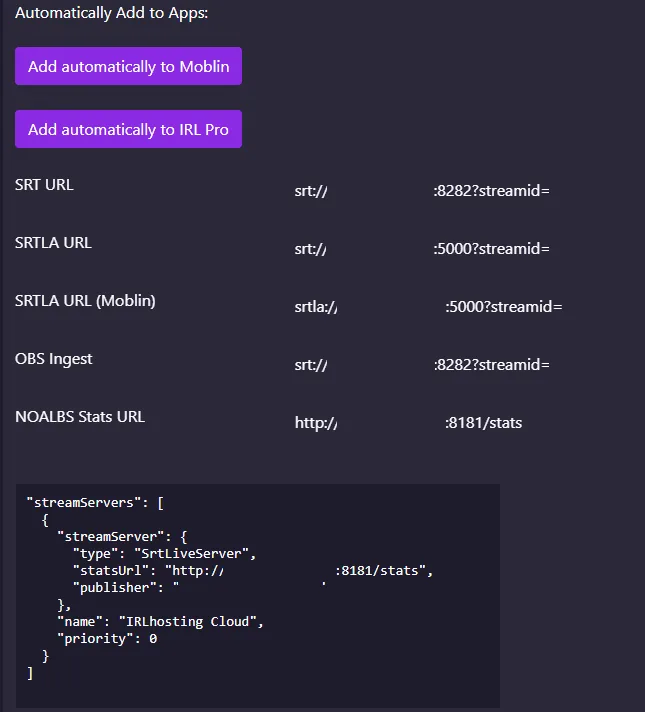
Log in to IRLhosting, open Services → My Services and pick your Cloud OBS or SimpleStreamer service. The connection details are on the service page:
| Field | Port | Use it for |
|---|---|---|
| SRTLA URL | 5000 | Bonded streaming from BELABOX, IRLbox, IRL Pro and other SRTLA senders |
| SRTLA URL (Moblin) | 5000 | The same address written as srtla://, the way Moblin expects it |
| SRT URL | 8282 | Plain SRT from a single connection |
| OBS Ingest | 8282 | The address OBS on the server reads your stream from |
| NOALBS Stats URL | 8181 | The stats page NOALBS checks for your bitrate |
Step by step
Power up and connect
Plug in the BELABOX and connect it to your local network.
Open belabox.local
On a computer or phone on the same network, go to
http://belabox.local. If the page doesn't load, open the BELABOX's IP address instead; you can find it in your router's list of connected devices.Open SRTLA settings
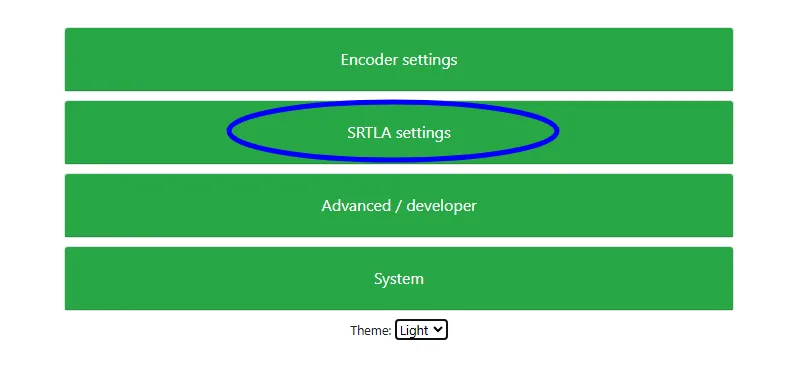
Scroll down and click SRTLA settings.
Enter your server
Fill in SRTLA receiver address with your server's address, SRTLA receiver port with
5000, and SRT streamid with your stream ID, all from your service page. If you're asked to choose an SRTLA relay server, choose Custom.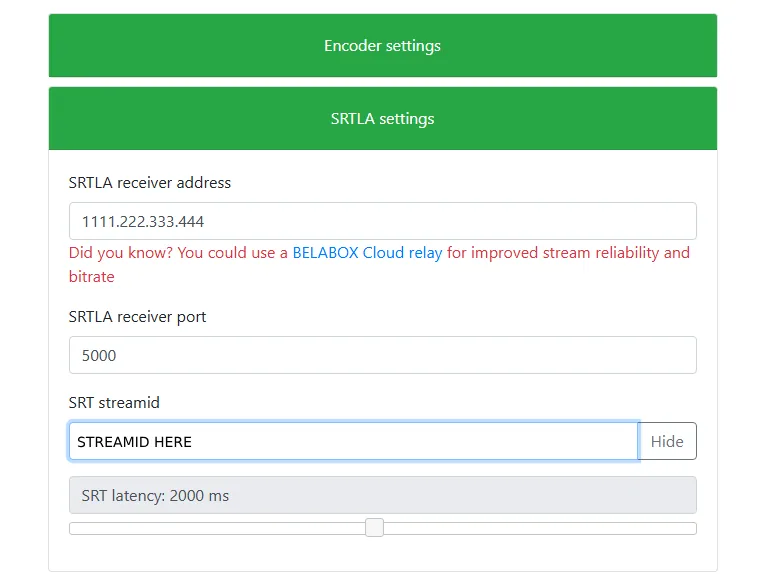
Check the latency
The SRT latency slider sets how long the server waits for lost packets. 2000 ms is a safe start on mobile data. Go higher if the picture breaks up on weak signal, lower if you want less delay.
Connect the camera and press Start
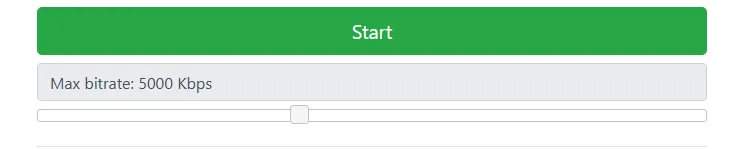
Turn the camera on, set a Max bitrate your connections can carry, and press Start. Your stream now arrives on your server.
On a Cloud OBS server the BELABOX feed shows up in your LIVE scene. Go live from IRLstudio, IRLremote or chat, and NOALBS switches to your BRB scene by itself when your signal drops.
BELABOX Cloud or your own server?
The BELABOX settings page suggests the BELABOX Cloud relay. A relay receives your bonded stream and passes it on. To add scenes, overlays, alerts and a BRB screen, you still need OBS running somewhere.
With an IRLhosting Cloud OBS server, the SRTLA receiver and OBS run on the same server, so your BELABOX feeds OBS directly and the server streams to Twitch, Kick or YouTube. If you only want a relay with a BRB screen and no OBS, SimpleStreamer is $14.99 a month and ready about 5 minutes after you pay.
If it doesn't work
- belabox.local won't open: use the device's IP address. Some phones and networks don't resolve
.localnames. - BELABOX says it's streaming but nothing arrives: check the port is
5000(SRTLA), not8282(plain SRT), and that the stream ID is copied exactly, with no space at the end. - The picture freezes or breaks up: lower the max bitrate or raise the latency. Work out what your connections can carry with the bitrate checker.
- Picking a server location: the server ping test shows which IRLhosting location is closest to where you stream.
FAQ
BELABOX setup: FAQ
What is belabox.local?
It's the address of the BELABOX settings page on your local network. Open http://belabox.local from a device on the same network as the BELABOX, or use the BELABOX's IP address if the name doesn't resolve.
Can I use BELABOX with a cloud OBS server?
Yes. Enter your server's SRTLA address, port 5000 and stream ID in SRTLA settings. Every IRLhosting Cloud OBS plan includes an SRTLA receiver, so the BELABOX feeds OBS on the server directly.
What port does SRTLA use on IRLhosting?
Port 5000. Plain SRT uses port 8282. Both are listed on your service page under My Services.
Do I need BELABOX Cloud?
No. Any SRTLA receiver works. Your IRLhosting server has its own, so you choose Custom and enter your server instead.
What SRT latency should I use with BELABOX?
2000 ms is a safe start on mobile data. Raise it if the stream breaks up on a weak signal, lower it if you want less delay.
Run your BELABOX into your own cloud OBS
Cloud OBS plans come with an SRTLA receiver, disconnect protection and IRLremote, set up for you.